
2-7.Workflow Setting
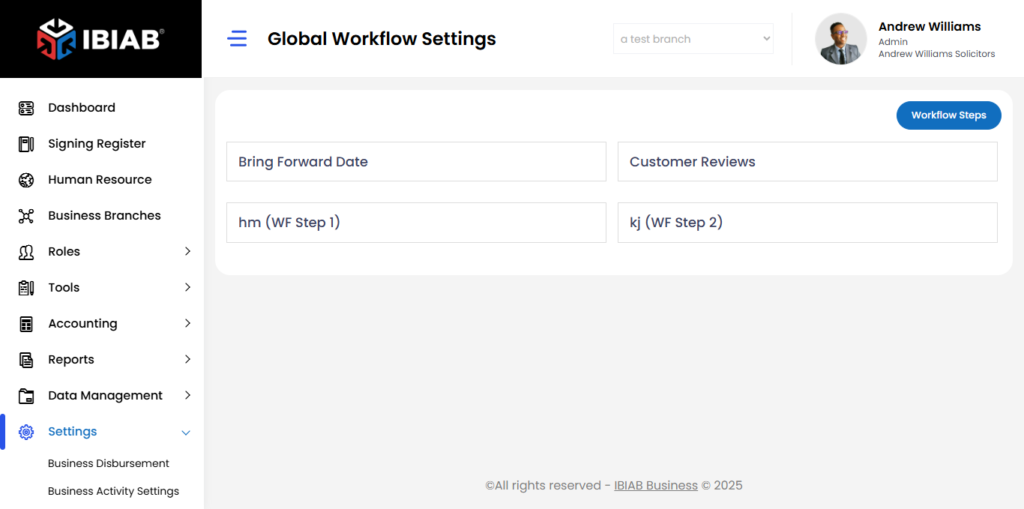
Workflow Settings in IBIAB help you define and manage the steps required to complete tasks efficiently. By structuring workflows, you ensure consistency, track progress, assign responsibilities, and streamline operations. This feature enhances productivity by standardizing processes, reducing errors, and improving accountability across your organization.
By clicking on Workflow Settings in the side menu, you will see a list of workflow steps, including both system-generated and custom-defined steps.
Understanding the Workflow List
- The list contains predefined and user-created workflow steps.
- Bring Forward Dates and File Reviews are system-generated default workflows that cannot be removed.
- Any additional workflow steps are user-defined and can be customized as needed.
Managing a Specific Workflow Step
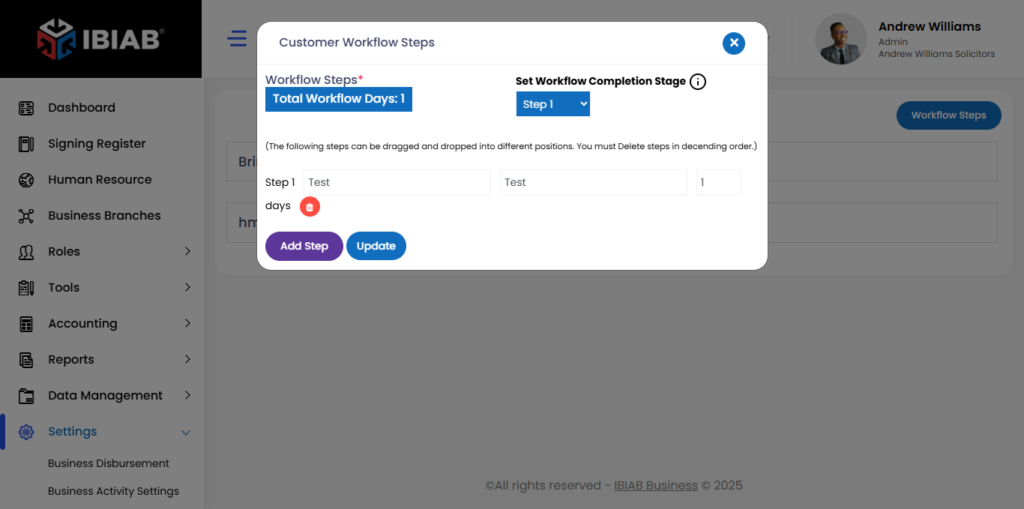
When you click on a specific workflow step, a popup window will appear, allowing you to update and manage its details. The popup contains the following fields:
Fields & Features:
- Total Workflow Days – Displays the total duration of the workflow.
- Set Workflow Completion Stage – Select the step that marks workflow completion.
Rearrange Steps – Drag and drop steps to adjust their order. (Steps must be deleted in descending order.)
- Step Description – Define the task for this step.
- Step Acronym – Enter a short identifier (Max: 20 letters).
- Days – Specify the number of days required for this step.
Once all fields are filled out, click the Update button to save the changes. This ensures that the workflow step remains structured and properly tracked within your business processes.