
2.4. Business Modules Settings
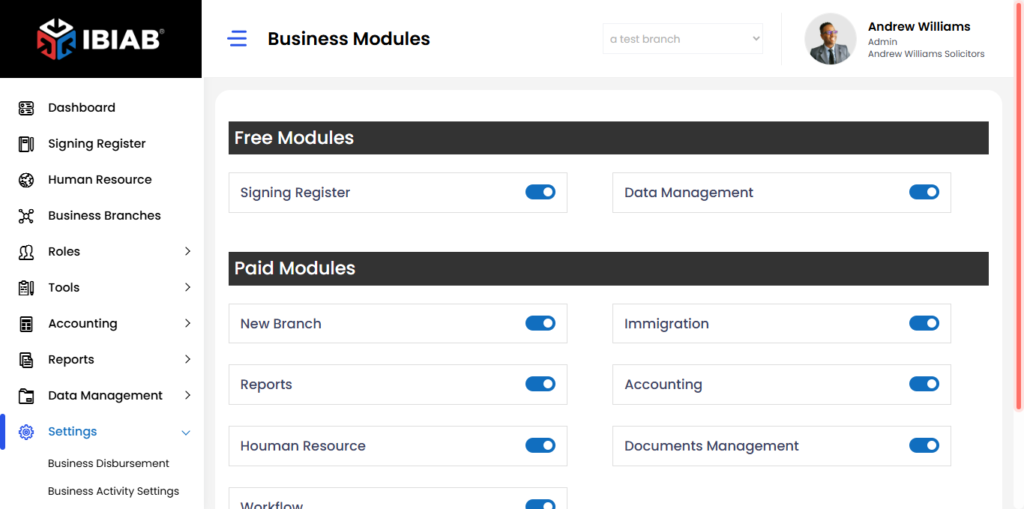
The Business Modules Settings page allows users to manage and enable/disable different modules for their business operations.
Sections in Business Modules
The page is divided into two sections:
- Free Modules – Available at no additional cost.
- Paid Modules – Additional features that require payment.
Free Modules
- Signing Register Module – Manages sign-in and sign-out activities for employees or visitors.
- Documents Management Module – Helps organize and manage documents sent to customers or other clients.
Paid Modules
- Add New Branch Module – Allows users to add and manage new business branches.
- Data Management Module – Helps organize and manage various customer data.
- Immigration Module – Handles immigration-related information for customers and business activities.
- Workflow Module – Automates business processes and workflows, allowing users to define steps to complete specific tasks.
- Human Resource– module supports staff management, including roles, permissions, timesheets, employment status, and document uploads
- Accounting– The Accounting module simplifies financial management by tracking bills, payments, recurring transactions, VAT calculations, and supplier invoices. It’s built to reduce manual effort by automating common financial workflows like invoice generation, payment receipt, and reconciliation.
- Reports– The Reports module helps you generate insights across different business activities. Whether it’s customer activity summaries, overdue tasks, billings, payment tracking, or workflow progress, this module provides both summary and detailed views in real-time.
Enabling or Disabling Modules
- Users can toggle between ON and OFF to enable or disable specific modules.
- Enabled modules will be available for use in the system.
📌 Tip: Only activate the modules you need to streamline business operations efficiently.