
2.1. Registering a New Business
Business Settings Fields
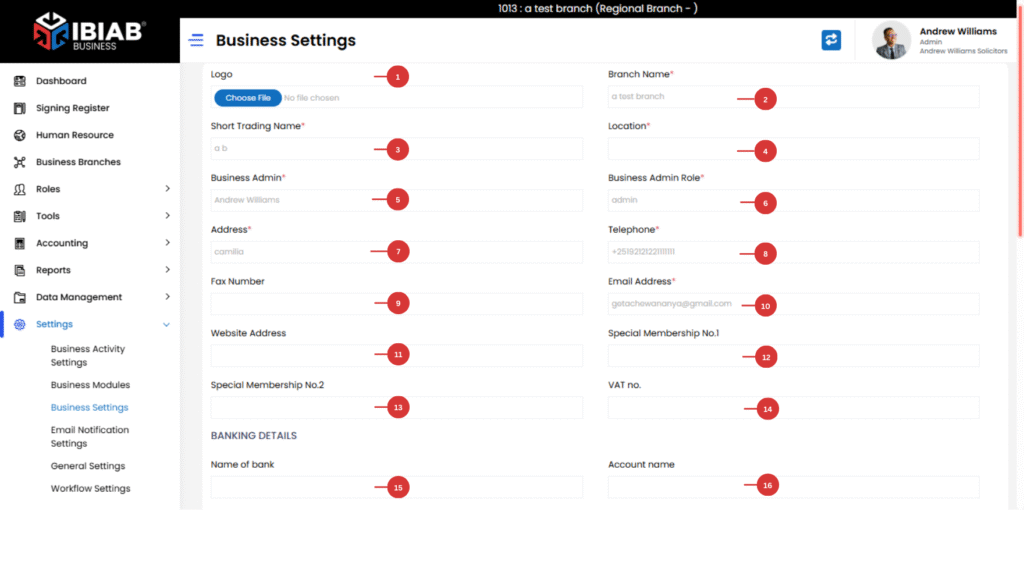
Basic Information
- Business Logo* – Upload your company logo.
- Business Name* – Enter the full registered business name.
- Short Trading Name* – Provide a short version of your business name.
- Location* – Provide your business location.
- Business Admin* – Assign the main admin responsible for the business.
- Business Admin Role* – Define the role of the business admin.
- Address* – Enter the official business address.
- Telephone* – Provide the main contact number.
- Fax Number – (Optional) Add a fax number if applicable.
- Email Address* – Enter a valid business email.
- Website Address – (Optional) Add your website URL.
Membership & Tax Details
- Special Membership No 1 – Enter your membership number.
- Special Membership No.2) – Provide your ILPA membership number.
- VAT No. – Enter your business VAT number.
Banking Details
- Name of Bank – Enter the bank name your business uses.
- Account Name – Provide the account holder name.
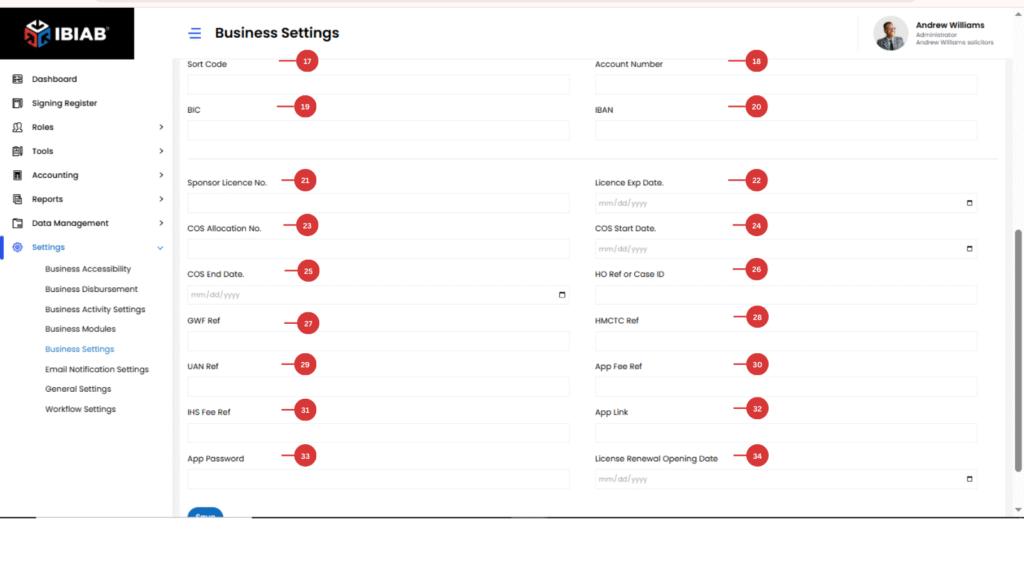
- Sort Code – Enter your bank sort code.
- Account Number – Provide the business bank account number.
- BIC – Enter your Bank Identifier Code (BIC).
- IBAN – Provide your International Bank Account Number (IBAN).
License & Immigration References
- Sponsor License No. – Enter your sponsor license number.
- License Expiry Date – Specify when your sponsor license expires.
- COS Allocation No. – Provide the Certificate of Sponsorship (COS) allocation number.
- COS Start Date – Enter the start date for the COS.
- COS End Date – Enter the end date for the COS.
- HO Ref or Case ID – Enter the Home Office reference or case ID.
Home Office & Application References
- GWF Ref – Provide the GWF reference number.
- HMCTC Ref – Enter the HM Courts & Tribunals Service reference.
- UAN Ref – Provide the Unique Application Number (UAN).
- App Fee Ref – Enter the reference for the application fee.
- IHS Fee Ref – Provide the Immigration Health Surcharge (IHS) reference.
- App Link – Add the link to the application.
- App Password – Enter the password for the application.
- License Renewal Opening Date – Add a date for License Renewal
📌 Note: Fields marked with an asterisk (*) are mandatory and must be filled in before saving changes.