
2.5.Email Notification Settings
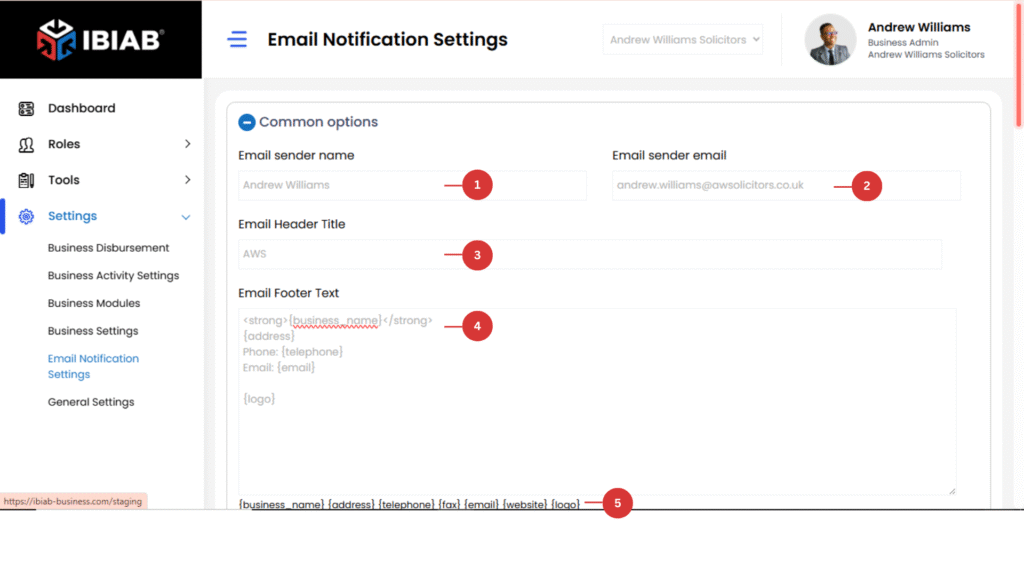
The Email Notification Settings page allows users to configure email notifications for different system events.
Email Notification Settings
Customize your email notifications by setting up sender details and message formatting.
- Email Sender Name – The name that appears as the sender in outgoing emails.
- Email Sender Email – The email address used to send notifications.
- Email Header Title – The title displayed at the top of emails.
- Email Footer Text – Custom text displayed at the bottom of emails.
- Dependent Field for email footer
📢 Ensure these details are correctly configured to maintain a professional communication experience!
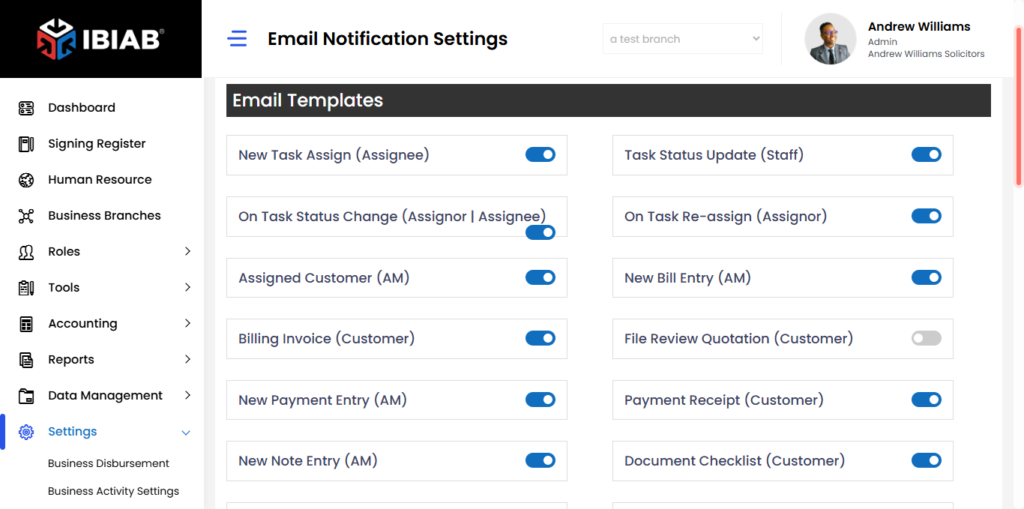
Task Notifications
- New Task Assign – Notifies the assignee when a new task is assigned.
- Task Status Update – Notifies staff when a task status is updated.
- On Task Status Change – Notifies both the assignor and assignee when a task status changes.
- On Task Re-assign – Notifies the original assignor if the task is reassigned.
📌 Billing & Payment Notifications
- Assigned Customer – Notifies the account manager (AM) when a customer is assigned.
- New Bill Entry – Notifies the AM when a new bill is added.
- Billing Invoice – Notifies the customer when an invoice is generated.
- File Review Quotation – Notifies the customer when a file review quotation is available.
- New Payment Entry – Notifies the AM when a payment is recorded.
- Payment Receipt – Notifies the customer upon payment confirmation.
📌 Document & Form Notifications
- New Note Entry – Notifies the AM when a new note is added.
- Document Checklist – Notifies the customer about document requirements.
- Terms & Conditions – Notifies the customer about terms & conditions updates.
- Initial Questionnaire – Notifies the customer when an initial questionnaire is assigned.
- Authority Form – Notifies the customer when an authority form is required.
- Final Letter – Notifies the customer when a final letter is available.
- Questionnaire Submitted – Notifies the AM when a customer submits a questionnaire.
- Authority Form Submitted – Notifies the AM when an authority form is submitted.
- Customer Care Letter – Notifies the customer when a customer care letter is available.
📌 Event & SMS Notifications
- New Event Entry (Attendee) – Notifies attendees when a new event is added.
- New Event Entry (AM) – Notifies the AM when a new event is added.
- New Event Entry (Customer) – Notifies the customer about a new event.
- SMS Login Reminder – Sends a login reminder to AM | BM via SMS.
- SMS Activity Checklist – Notifies the AM about activity checklists via SMS.
- SMS Message Board – Notifies the BM about new messages via SMS.
📌 Business Customer Notifications
- Business Customers Form – Notifies the business about a customer form.
- Business Customers Form Submitted – Notifies the AM when a business customer form is submitted.
📌 Reminder Notifications
- Task Due Reminder – Notifies the assignee when a task is due.
- Matter Submission Due Report – Notifies the AM about pending matter submissions.
- Task Overdue Reminder – Notifies the assignee when a task is overdue.
- Questionnaire Submit Due – Notifies the customer when a questionnaire is due.
- Questionnaire Submit Due (AM) – Notifies the AM when a questionnaire submission is due.
- BF Date Expiry Report – Notifies the AM about approaching BF expiry dates.
- File Review Due/Overdue Report – Notifies the AM about pending or overdue file reviews.
- Visa Expiry Reminder – Notifies AM | BM when a visa is about to expire.
- Visa Expired Reminder – Notifies AM | BM when a visa has expired.
- Passport Expiry Reminder – Notifies AM | BM when a passport is about to expire.
- Passport Expired Reminder – Notifies AM | BM when a passport has expired.
📢 Customize your email alerts to stay informed and never miss an important update!