
2.2. Business Accessibility Settings
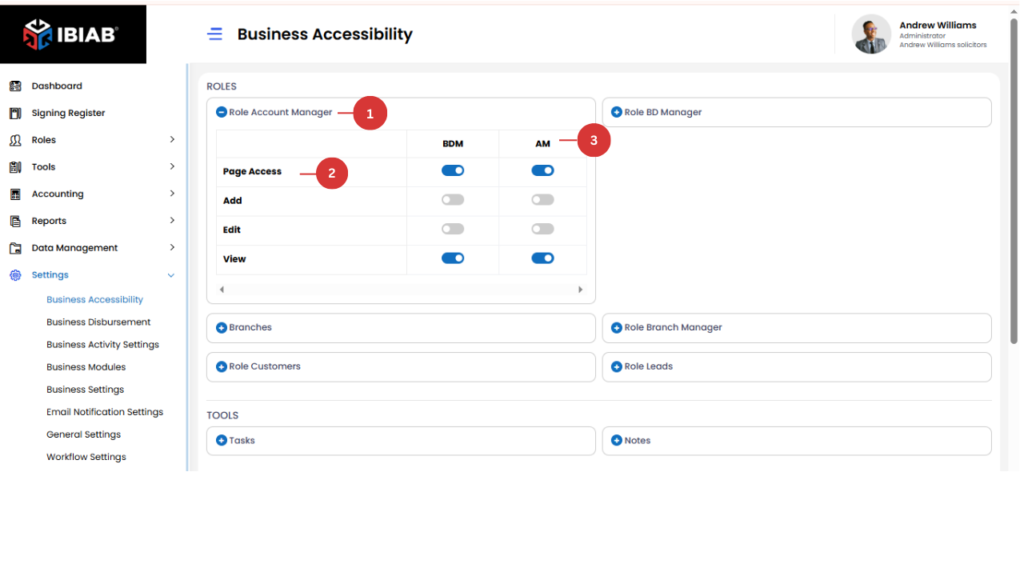
The Business Accessibility page allows users to manage permissions for different roles, determining which pages and features each role can access.
Sections in Business Accessibility
The page is divided into three sections:
- Roles – Lists all available roles in the system.
- Tools – Features or functionalities that can be controlled per role.
- Accounting – Permissions related to financial data and transactions.
Managing Role Permissions
- Under the Roles section, all roles are listed.
- Users can click on a specific role to expand its settings.
- Each role has different permission types, such as:
- Page Access – Controls whether the role can access a specific page.
- Add – Determines if the role can add new entries.
- View – Allows viewing of information without editing.
- Page Access – Controls whether the role can access a specific page.
Permission Toggle
- There are two columns representing different roles:
- Business Development Manager
- Account Manager
- Business Development Manager
- Users can toggle between ON and OFF to enable or disable permissions for each role on specific pages and actions.
📌 Tip: Carefully manage permissions to ensure users have access only to the necessary features.
Account Manager Page Access Permissions
- Role: Account Manager
- Permission Type: Page Access
- Who Can Access:
- Business Development Managers (BDMs)
- Account Managers
- Business Development Managers (BDMs)
Both BDMs and Account Managers have permission to access the Account Manager Page to manage relevant business operations.