
6.5 Workflow
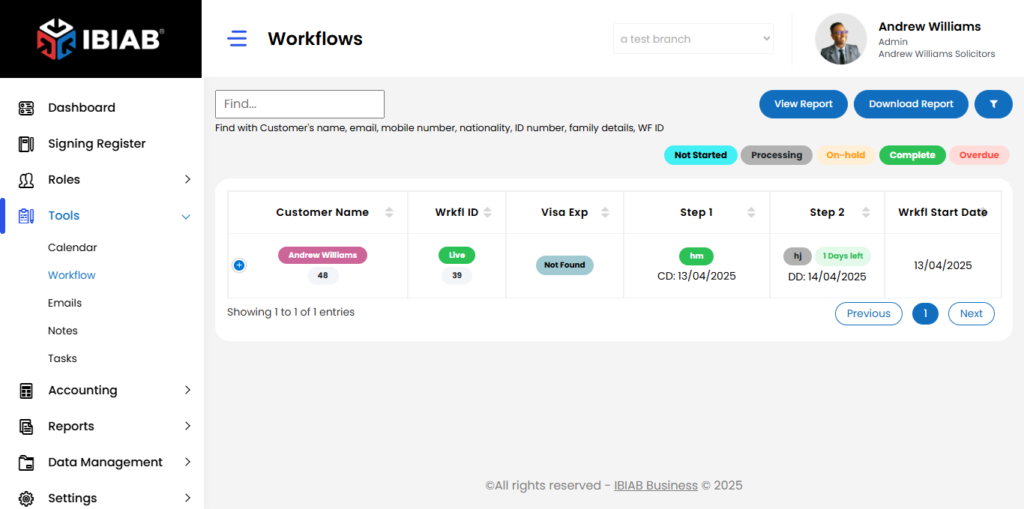
The Workflow module in the IBIAB platform is designed to streamline and monitor customer processes from start to finish. When this module is toggled ON in the Modules Settings, additional workflow-related features are unlocked across the system—specifically under Tools > Workflow, Client Details, and Settings.
The Workflow page offers a comprehensive table that provides a real-time snapshot of each customer’s journey through their assigned workflows. The table includes critical columns such as:
- Customer Name
- Wrkfl ID
- Visa Exp
- Step 1, Step 2 (and so on to represent progress)
- Workflow Start Date
- Workflow Completion Date
- Workflow Completed On
- Customer Activity
- Account Manager
- Entered On
At the top of the page, users can find View and Delete options for each workflow. You can also download or view reports related to workflow performance directly using the buttons above the table.
This module enhances visibility and accountability, making it easier for admins, account managers, and caseworkers to keep tasks aligned with deadlines, track step-by-step progress, and ensure that client cases are handled efficiently from intake to final completion.